
Redefining how people work with AI.
Factorial / SaaS / B2B
At Factorial, we set out to rethink how humans interact with digital tools. Instead of forms, clicks, and endless dashboards, we imagined a world where users simply talk to the product.
I led the early-stage design of One, Factorial’s AI assistant: a conversational, modular interface that transforms complex workflows into natural, intuitive experiences. In just six months, our cross-functional team turned this vision into reality.
Starting Point —
From Scattered Experiments to a Shared Vision
During my first Product Review at Factorial — our quarterly ritual for reflecting, sharing, and aligning as a company — it quickly became clear that while teams were already exploring AI in small ways, the effort was fragmented. Teams were running isolated experiments, but we were missing a unified vision.
Then we made a decision: “We’re going AI-first”. It was clear that we needed a shared vision, but beyond that, three powerful drivers were pushing this movement forward:
A clear business opportunity: integrating AI deeply into our product could multiply user productivity and unlock new revenue streams by transforming how HR teams operate.
The competitive landscape was heating up: established players were starting to promote AI capabilities, and new startups were entering the market with lightweight, conversational products.
User behaviour was changing fast: The rise of tools like ChatGPT had democratized AI, and people now expected to accomplish tasks through natural conversation rather than endless navigation. The shift from clicks to dialogue was not a trend — it was a paradigm change.
The challenge was huge: users were still trapped and wasting a lot of time in forms, buttons, and dashboards, while the world was moving toward natural conversation. To lead this change, we had to rethink every layer of our product — from interaction patterns to information architecture.
The Discovery —
The Problem Beyond the Sparkles
Behind the excitement around AI assistants and shiny new features, the real problem we needed to solve was much deeper: HR professionals were overwhelmed by the complexity of digital tools that required endless clicks, navigation, and manual input.
They were also spending an enormous amount of time answering the same recurring questions from employees — like “How many vacation days do I have left?”, “Where can I download my payslip?”, or “Who’s on shift tomorrow?” — questions that could and should be handled automatically. Data was scattered, insights were hard to find, and even simple actions, such as approving time off or checking analytics, often required too many steps.
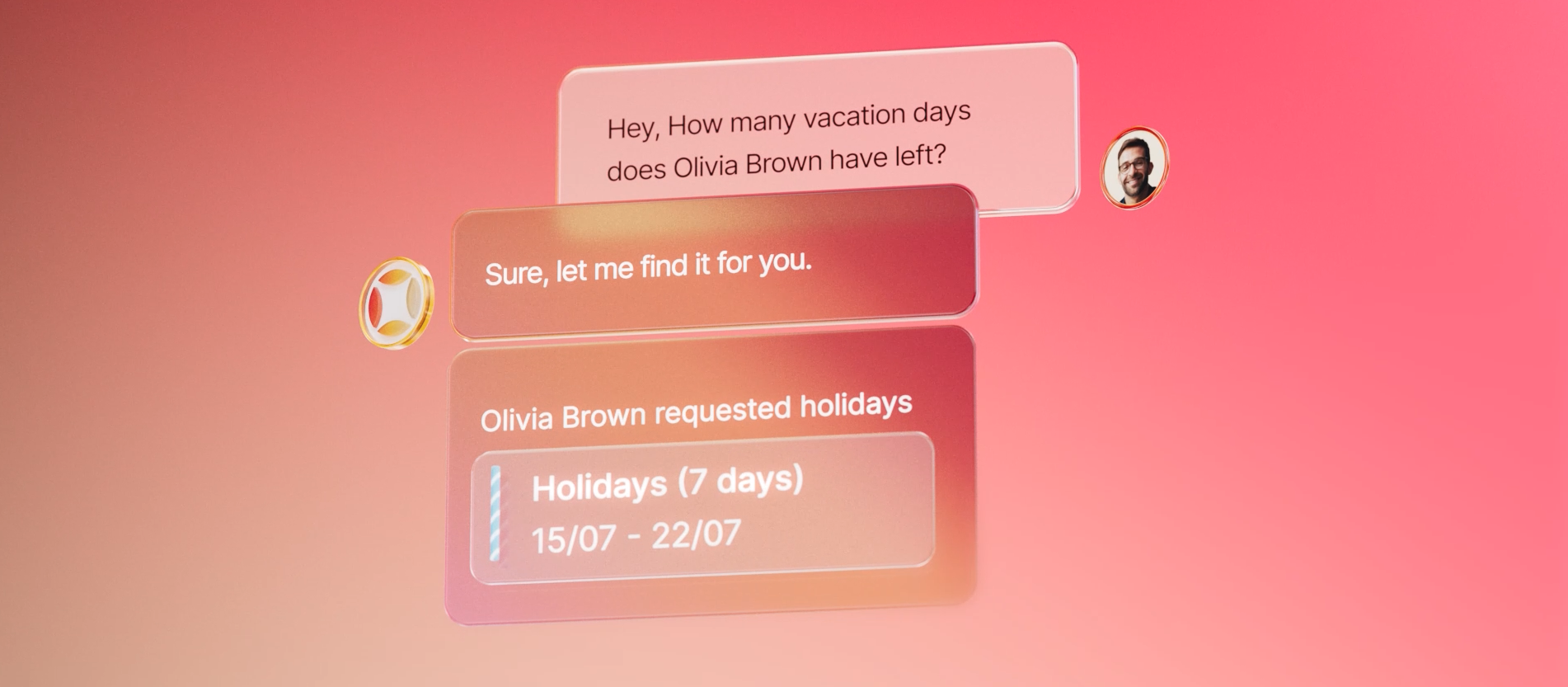
To dive deeper into this problem and understand our users’ main pain points, we defined a discovery plan combining user interviews, usage data analysis, and insights from Account Managers who were closest to our customers.
Through interviews with HR admins and managers, we discovered how much time was lost on repetitive tasks and disconnected flows. They often described frustration with simple requests taking too long — creating a survey, running a report, or checking who’s on leave.
In parallel, we analysed thousands of product queries and Help Centre searches. Patterns emerged quickly: most users were asking the same questions, looking for the same information, and struggling in the same areas.
Our Account Management team added another layer of insight. They reported that HR and Finance leaders consistently mentioned the same pain points: information scattered across modules, slow manual approvals, and complex configuration flows. By mapping these patterns, we identified the processes that caused the most friction and the ones that could generate immediate value if reimagined.
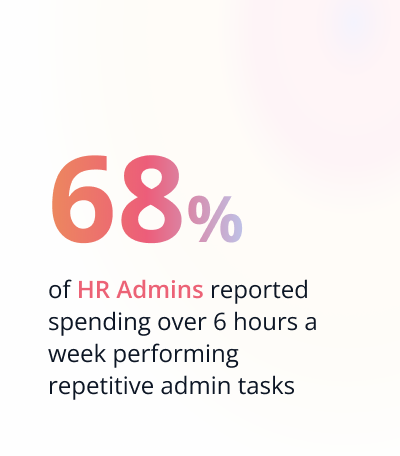
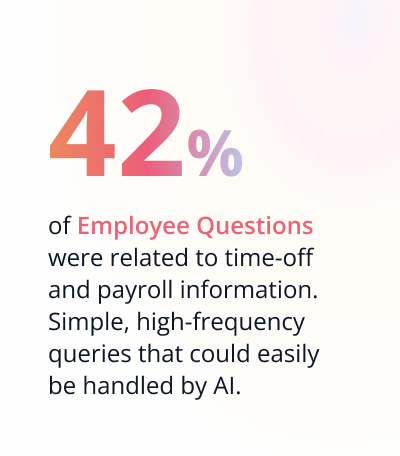
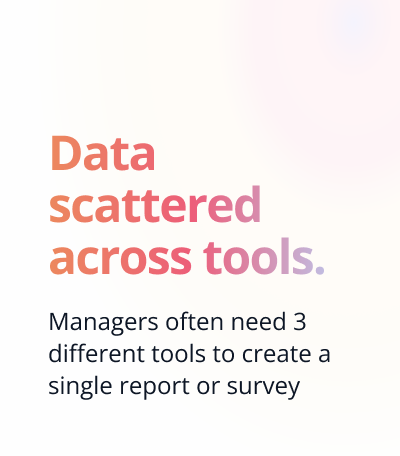
To complement the qualitative insights, we analysed how the product was being used and identified the workflows that created the most friction for both users and teams. That led us to choose the perfect pilots: flows that were critical for users, data-heavy, and offered the best opportunity to prototype and demonstrate real impact quickly.
The Vision —
We combined insights and a deep analysis of other AI-first tools to lay the groundwork for defining the foundations, key capabilities, and an ambitious roadmap of our AI Assistant.
Our vision was crystal clear:
Turning complex HR processes into natural, efficient, and even delightful experiences to align human intent with automated execution.
This approach not only empowers HR admins but also benefits finance teams, line managers, and employees alike — giving everyone faster access to information, fewer repetitive tasks, and more time to focus on meaningful work.
Our ambition was to let users talk to the product in plain language — “Create a performance review,” “Show me who’s on vacation next week,” “Build a survey about team motivation”. What happens when software stops asking for clicks and starts understanding intent became the starting point of a new vision for Factorial.
As we shaped that vision, we also integrated some of the most promising features being explored across teams — like smart shift planning, automated approvals, or personalised insights for talent management — to make our assistant even more powerful and relevant to real business workflows.
We called it One — and it looks something like this:
The Process —
Defining the 3 Pillars of One
To deliver value quickly and build a scalable foundation for our AI Assistant, we defined 3 core pillars that would shape One’s capabilities and allow it to grow horizontally across the platform.
Based on everything we learned from research, we gave One three distinct powers: a chat that could answer any question, a co-creation assistant to help users build content effortlessly inside Factorial, and an analytics engine that generates the data you need and helps you understand it.
One Chat. The Conversational Layer
We started by defining what “conversation” means in a product as complex as Factorial. After some explorations, we identified six main categories of intent — each demanding a different structure, reasoning model, and UI response:
Directory. Helps users find people, locations, or entities instantly through structured data, such as “Show me everyone in the Barcelona office today”.
Help. Acts as a contextual guide, explaining how to complete tasks or where to find information.
Creation. Helps users perform simple, action-driven tasks directly through conversation, for example, creating a time-off request, booking a meeting room, or adding a new employee to the system.
Analytical. Interprets and summarises metrics or trends, returning dynamic visuals such as charts or tables. It’s the starting point of our analytical pillar.
If you’ve read the rest of the case, you already know that we wanted to go beyond a simple conversation and make One visually intelligent. So instead of always replying with text, One can respond with the right interface component — a chart, a table, a card, or a button — whatever best fits the task. This blend of conversation and interface became the foundation of our design strategy, allowing One to feel both smart and tangible.
Taken together, this turns One into the perfect companion — always available, context-aware, and seamlessly integrated. It helps you navigate, understand, and act — whether you’re searching for a person, checking your team’s attendance, or analysing turnover.
Co-Creation Assistant. Designing With Users
The second pillar pushed the boundaries of what collaboration with AI can look like. We built a co-creation process that lets users and One build together — in real time.
Our MVP focused on surveys. A user can simply type “Create a survey about engagement and stress levels,” and One instantly generates a draft. The user can then adjust it — either by chatting (“Add a question about workload”) or by editing directly in the interface.
Here’s the magic: One understands those manual changes. It reads what the user edits and continues the conversation from that updated version. This two-way link between natural language and direct manipulation is extremely powerful and makes One truly unique.
One Analytics. Data You Can Talk To
The third pillar of One focuses on transforming how people interact with data. We wanted reporting to feel as simple as having a conversation — no filters, no dashboards, just questions and answers. Users can now just ask things like “Show me the sales team’s costs from the last 6 months” or “Create a report with the overtime in the last 3 months and compare it with the previous quarter”.
One transforms those prompts into live reports, editable and explainable. Users can keep refining them through conversation or directly in the interface. The result: reporting becomes fast, contextual, and human — not a fight with filters and spreadsheets.
Designing for Trust and Control
To make One coherent and reliable, we defined a set of design principles to guide its behaviour and ensure consistency across every interaction. They were created to help One’s capabilities scale seamlessly across the product and to make it easier for other teams to build AI-powered experiences on top of it. These principles are now our compass, keeping One smart, safe, and human.
Transparency. Make AI visible and understandable.
Users should always know when they’re interacting with AI, why a result appears, and what data supports it. We use consistent labelling, clear explanations, and empathetic feedback to build trust and reduce uncertainty.Human Tone. Speak like a teammate, not a machine.
One speaks like a colleague: approachable yet professional. Its tone reflects Factorial’s voice — helpful, confident, and human.Simplicity & Focus. Focus on clarity and flow.
AI should simplify the experience, not complicate it. One appears only when it adds value, keeping the interface clean, minimal, and free of noise. Progressive disclosure ensures users see what matters, when it matters.Human Control. Keep humans in charge.
One accelerates work but never replaces judgment. Each automated action is transparent, reversible, and adjusted to its level of risk and impact — from safe auto-execution to human review for sensitive decisions.
Operationalising Human Control
To bring this last principle of Human Control to life, we needed a way to define how and when One should act autonomously — and when it should defer to the user. That’s why we designed an impact-based automation framework that classifies every AI action by risk and impact level, ensuring that automation always feels powerful, but never unpredictable.
Low risk: One acts autonomously for repetitive, low-impact tasks (like filling forms or tagging data) while logging every change for transparency.
Medium risk: One suggests an action and the user confirms it (for example, editing schedules or recommending competencies).
High risk: One assists but never executes (such as publishing policies or approving contract changes).
Testing and Validation —
We ran several weeks of internal validation. The goal was simple: make sure One doesn’t just answer — but answers well.
First, we conducted several sessions with internal users that helped us refine key UX details — like replacing the original floating modal with a contextual side panel that fits naturally into users’ daily workflows — and also served as the foundation for evaluating One’s intelligence and reliability.
On top of that, and to measure performance consistently, we began building our evals framework: a structured process to test One’s accuracy, consistency, and behaviour across different intents. At this stage, the framework uses curated datasets of real questions and answers to calculate accuracy rates. Current results show 85–90% accuracy for analytical use cases, and up to 100% when dealing with predefined questions or templates.
As we evolve, we’re working toward more standardised evaluation methods using Braintrust, integrating automated feedback loops between users and the agent. This will allow One to learn from real interactions and adapt its responses dynamically — not just at a general level, but tailored to each company’s specific context.
Impact —
We launched One in October 2025, marking a key milestone in Factorial’s transition toward becoming an AI-first company.
The rollout began progressively, starting with internal teams and early-adopter customers, before expanding to selected beta partners across multiple product areas.
One month after launch, adoption and business impact have exceeded expectations:
In just the first week after launch, 12 companies joined the private beta, and more than 2,000 additional companies signed up for early access, reflecting a growing demand for AI capabilities.
Hundreds of companies are already using One in production environments.
The new product line is contributing significantly to Factorial’s ARR growth, putting us on track to reach a major internal milestone within the first quarter after launch.
Attach rates are already comparable to other mature product lines.
Customers in the 50–200 employee range show the highest engagement, confirming the scalability and value of an AI-first experience for mid-market organizations.
As we continue to expand, the next phase will focus on strengthening co-creation and analytics, while enabling every product team to embed One’s capabilities directly into their own verticals, turning AI into an integral layer of the entire Factorial platform.
Also, during these days, we launched a campaign that captures the essence of what One represents: the beginning of a new way of working with technology: faster, smarter, and more human.
Take Aways —
Leading the design of One taught me what it really means to design for the future.
It forced us to unlearn old habits and design from first principles — focusing less on where users click, and more on what they’re trying to accomplish. Designing with AI means shifting from creating interfaces that users navigate to building systems that understand them.
We’re standing at the beginning of a paradigm shift. Just as the iPhone redefined interaction by bringing touch to digital interfaces, AI is now reshaping the way we think about usability itself. Over the next few years, we’ll move from designing static flows to crafting dynamic conversations — experiences that anticipate needs, adapt in real time, and feel increasingly human.
For me, One represents more than a product. It’s a bridge to that future — where software becomes a collaborator, not just a tool. A future where design is no longer about where users click, but about how they think, feel, and communicate.
The best part? We’re just getting started.
— Previous Project
Next Project —